Blog

  • Third Party Smart Plugs in Alexa App / Amazon Echo stopped working

    Since December 2020 last year, third party plugs such as GoSund Smart Plugs connected via Smart Life or Go Smart App through Amazon Alexa Skills stopped working.

    You need to disable the skill then re-ensbled it again via the Alexa App to make it work. It works for a few days or minutes, then it will become unresponsive again.

    Relinking, uninstalling then reinstalling the app will fix it temporarily then it will become unresponsive again.

    GoSund or Alexa support will just suggest the common troubleshooting methods that I mentioned. So if you encountered the same issues as I am, then just do the basic troubleshooting methods I mentioned.

    There’s no absolute fix yet. I suggest if you’re new to Alexa / Amazon Echo devices, just buy the official smart plugs. My official Amazon smart plug didn’t stop working when all else aren’t working.

    Third party smart plugs still work via their respective apps. It just doesn’t work seamlessly via voice commands through Alexa.

  • How to remove inactive cameras in your Chrome Browser in MacOS

    I’ve been googling about this since yesterday and I can’t find any solution to remove the inactive cameras that are already uninstalled from my Mac.

    I previously installed OBS Virtual Cam and the GoPro Camera in my MacOS Catalina. But after upgrading to MacOS Big Sur, GoPro WebCam stopped working. It will just display the GoPro loading screen, but won’t start the cam.

    So… I decided to just uninstall the GoPro WebCam software as it’s completely unusable. This issue is posted last November 2020 in the GoPro Support Hub, but until now, there’s no resolution or official fix from the GoPro Team.

    Now after uninstall the GoPro camera, it will still default to the GoPro camera in Google Chrome Browser. For example, if you use MyCrypto.com and scan your QR code, the GoPro camera will by the default camera, even if you change it in your Chrome settings at chrome://settings/content/camera (mine is brave://settings/content/camera, because I’m using the improved version of Chrome which is Brave.)

    I already selected the FaceTime HD Camera as you can see in the screenshot. Both OBS Virtual Camera (m-de:vice) and GoPro WebCam (o We:bcam) are already uninstalled, but it’s still appearing the list of options.
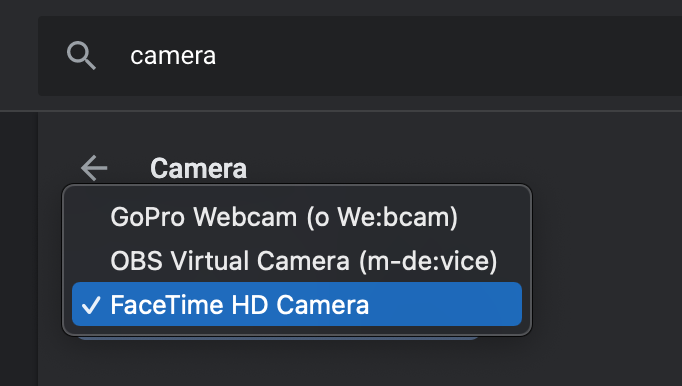
    And there’s a bug in Chrome where-in it will still default to the previous default Camera even if it’s already uninstalled from your system.

    What I did is viewed background processes on Activity Monitor, search for GoPro, and found a running background process called GoProWebcamDaemon.
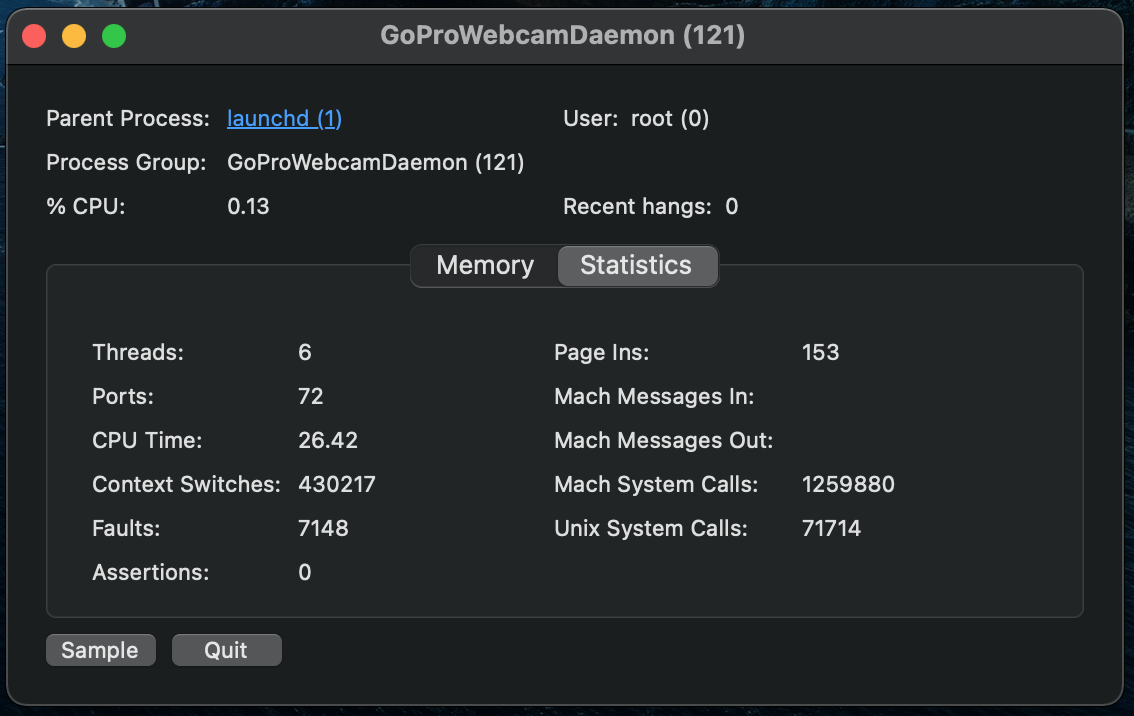
    I clicked sample, and found a directory where an instance of a GoPro file still exists. Maybe this is a software that still runs after I deleted the GoPro WebCam app in the applications folder already. So I went ahead and disabled the Daemon, and browsed through the directory and found a .plugin file.

    In my folder when I browse Macintosh HD > Library > CoreMediaIO > Plugi-Ins > DAL, I found two plugin files as show in the screenshot below.
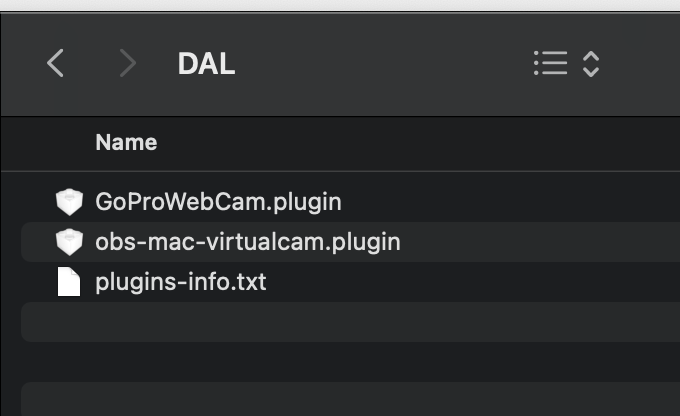
    I deleted both GoProWebCam.plugin and obs-mac-virtualcam.plugin, then checked my Chrome Camera settings, and both inactive + uninstalled cameras still exists.

    I restarted my Mac (because of the forced update, to install it as well), then poof! The two inactive cameras are gone.

    Now my browser camera defaults to Facetime HD Camera!

    If you encountered the same problem, I hope this solution helped you. As I cannot find any reference online, so I just posted this myself to help others who encountered the same situation as I am.

  • WordPress Theme with Dark Mode using the 2021 Theme!

    WP default themes keep on getting better and better. Now with the default Twenty Twenty-One theme, you have an option to support dark mode. Then you can toggle it on and off using the button on the lower part of your screen.

    BryanVeloso.com is now using the latest default theme for 2021. It’s a one column with 3-column footer for widgets. It’s pretty straightforward, simple and fast. You can add your logo in the header, and that same logo appears in the lower left part of your footer.

    Simplicity is what makes this blog theme special. You can also make your post show the full posts by default, or just an excerpt of your blog post in the customization settings. No need to add “read more” on every blog post you make.

    This theme is simple, fast, elegant, and modern. You’ll love it if you’re a minimalist like me. The default light mode and dark mode colors adapt well in all colored logos with transparent background.

    I didn’t adjust me logo color anymore to adjust with the theme’s default color options. It simple works, good to the eyes, and UI is fantastic.

    I’ll be using this theme for the entire year of 2021 until the WordPress Twenty Twenty-Two theme is released.

  • Bitbucket Connection Refused / No Route to Host (Siteground Server)

    If you recently encountered this issue when pushing a your git updates to Bitbucket and you’re using Siteground as your server, then you found your solution. I recently encountered this issue in my multiple Siteground hosts, using shared or cloud SG servers.

    Not really sure if this is a Siteground issue or a Bitbucket issue, but changing the port via config works.

    One solution I found online is adding 104.192.143.2 bitbucket.org to your /etc/hosts file. But sadly, at Siteground GoGeek servers, you have limited access and you cannot access your hosts file.

    If you’re getting a No Route to Host error, or a Connection Refused error when trying to push repo updates/commits.

    Just go to your .ssh/config file (create one if you don’t have one yet), and add these lines:

    Host bitbucket.org
    Hostname altssh.bitbucket.org
    Port 443

    No need to thank me. I just found the solution here by oliverkocsis.
    https://jira.atlassian.com/browse/BCLOUD-9519

  • Worst Customer Service in the World Goes to Food Panda!


    Earlier today, I ordered 4 brewed Iced Tea (the good old Libertea) from Army Navy. After waiting for an hour, my order finally arrived. To my surprise, it’s not what I ordered. They sent me 4 Milktea with Pearls instead of the Libertea Iced Tea that I ordered.

    I then reported it to Food Panda customer support. I showed them the picture via chat and they told me that it says Libertea in the bottle, so I received the correct item. I insisted that it’s not correct and Army Navy is using the SAME bottle for both Libertea Brewed Iced Tea and Libertea Milktea with Pearls. They told me that someone will call me to resolve the issue as soon as possible.

    An Indian Customer Agent with a weird accent I can’t clearly comprehend called using the number +1 287-066-3630. Asked some questions to verify my account details, then informed me that they know that I received an “INCORRECT” item, and they can neither refund me nor pick-up and redeliver the correct item, which is the Libertea Brewed Tea. I told the agent once again that this is not what I ordered, and the agent told me that there’s nothing they can do to correct the situation, they cannot re-deliver or exchange the item with the correct one.
    (more…)

  • Look-alike: Niv Sultan and Alicia Vikander

    They look like long lost twins. At first, I thought Alicia Vikander knows how to speak Hebrew and Farsi, but to my surprise, Tehran’s leading actress isn’t Alicia Vikander but another actress named Niv Sultan.

    They are both hot and pretty with striking resemblance. I just can’t resist to not blog about it as I cannot find any articles or blog posts that already did.

    So here you go! Niv Sultan and Alicia Vikander looks exactly the same. Like long lost twins!

    (more…)
  • JetPack is getting smarter and smarter

    Recently today, I upgraded my PHP version to 7.4.4. After a few minutes, I received an e-mail that my website is offline. It says that “Your Site is Experiencing a Technical Issue”. But good thing, I have JetPack. Gone are the days when your WordPress website is down or just blank white, and you don’t know what to do.

    Now, non-living things are getting smarter and smarter. I now know why my website is down and what’s the root cause of the issue. No need to troubleshoot it anymore. You’ll receive a link to enter your website in “recovery mode”, and you will also receive via e-mail all the details about which plugins caused the issue.

    Mine was this:

    Current plugin: Audio player (version 2.0.4.6)

    Error Details
    =============
    An error of type E_PARSE was caused in line 903 of the file /wp-content/plugins/audio-player/audio-player.php. Error message: syntax error, unexpected ‘new’ (T_NEW)

    So I just went ahead to my server and deleted that specific plugin that I don’t even use anymore. And eureka! My website is back online! Easy peasy right?

  • How New Technology Can Affect Your Cyber Security Education

    The digital world is brimming with opportunities for new careers every day. Whether you’re interested in becoming a digital analyst, an IT engineer, or a forensic computer scientist, the career options for your degree in cyber security are nearly limitless. However, new technology is constantly on the rise, and it has the potential to change your digital workplace in countless ways. If you’re interested in becoming a cyber security specialist, here are a few examples of how evolving technology could impact your career.

    It Can Make Your Job Easier…

    For almost every instance of a cyber security breach, the digital world has the opportunity to learn from the experience and strengthen its security measures. Firewalls are stronger, encrypted data is harder to crack, and VPNs are constantly being enhanced to keep sensitive information locked up tight. Better defensive measures also give way for better offensive measures, meaning new technology can make it easier to track down and stop cyber attacks before information is compromised. With the innovation of smartphones and other ultra-portable computers, it’s easy to stay on top of cyber security from almost anywhere in the world.

    …And More Challenging

    (more…)