Blog

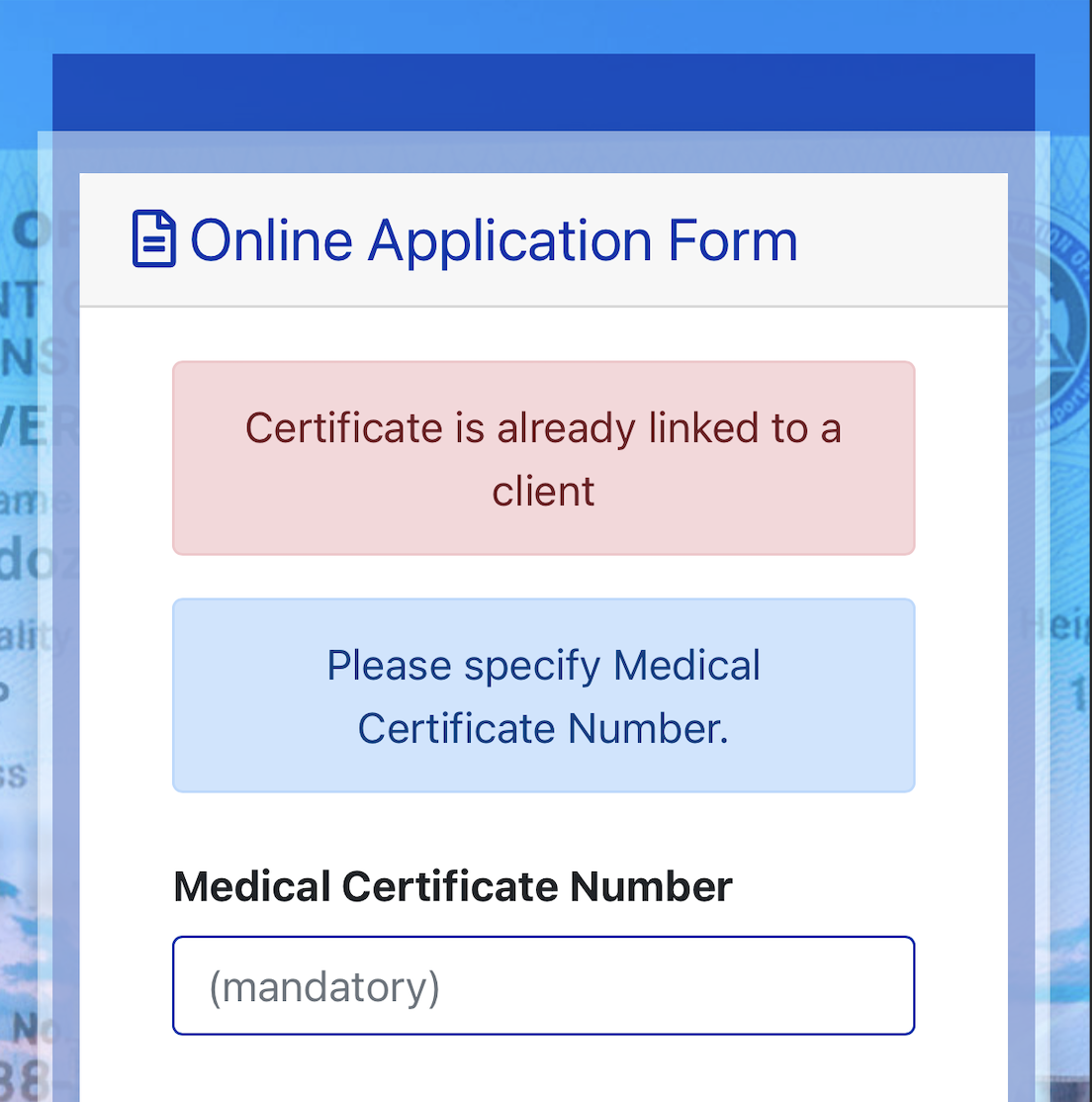
  • Medical “Certificate is Already Linked to a Client” Error in LTO LTMS Portal

    Recently I attempted to renew my Driver’s License purely online (just like when I renewed my motor vehicle registration) and I failed. If you’re like me trying to renew your driver’s license online through the Land Transportation Management System (LTMS) portal and encounter the error message “certificate is already linked to a client,” you’re not alone. This error typically occurs when you’ve obtained your medical certificate from a clinic near an LTO office.

    Why This Happens:
    Medical certificates issued by some LTO-accredited clinics are directly linked to your record, but they might not be valid for full online renewal. If your medical exam was conducted at a nearby clinic affiliated with the LTO, the system will flag your certificate as already linked. This means that while your certificate is valid, it is not eligible for 100% online processing.

    What You Should Do:
    If this happens, your best course of action is to proceed directly to the nearby LTO office where you got your medical certificate. You can complete the renewal process in person at the same location. Unfortunately, only a select few accredited clinics issue medical certificates that are fully compatible with the LTMS portal for online renewal.

    Key Takeaway:
    To avoid future inconveniences, check if the clinic you’re visiting for your medical exam is accredited for online renewal. Otherwise, you may need to handle your renewal at an LTO office after obtaining your certificate.

    By following this process, you can ensure a smoother renewal experience!

  • UnionBank Quasi Cash Fees on GrabPay Cash-Ins: A Closer Look at the “Scam”

    UnionBank, one of the leading financial institutions in the Philippines, has recently been under scrutiny for charging quasi cash fees on GrabPay cash-ins. Many users are outraged, calling it a “scam” and questioning the fairness of these charges. But what exactly is happening here, and why are so many people upset?

    What Is a Quasi Cash Fee?

    Before diving into the specifics, it’s essential to understand what a quasi cash fee is. Traditionally, quasi cash refers to transactions that involve purchasing items that can be easily converted into cash, such as gambling chips, foreign currency, cryptocurrency, or money orders. Because these transactions are akin to cash withdrawals, banks often treat them as such, applying fees to mitigate the risks associated with them.

    The UnionBank and GrabPay Situation

    In the case of UnionBank and GrabPay, the issue arises from the bank charging quasi cash fees when users top up their GrabPay wallets using a UnionBank credit card. GrabPay is a digital wallet that allows users to pay for rides, food deliveries, and other services within the Grab ecosystem. However, unlike traditional quasi cash transactions, the funds in a GrabPay wallet are restricted to use within the Grab platform. They cannot be withdrawn as cash or used outside of the Grab environment.

    Why Users Are Calling It a “Scam”

    The outrage stems from the fact that users feel deceived by UnionBank’s classification of GrabPay cash-ins as quasi cash transactions. Here’s why:

    1. Limited Use of Funds: Unlike traditional quasi cash, the funds loaded into a GrabPay wallet are not transferable or withdrawable. They can only be used for specific transactions within the Grab ecosystem, such as paying for rides, food deliveries, and other in-app services. This limitation means that users are essentially paying a cash advance fee for something that does not function as cash.

    2. Unexpected Fees: Many users were caught off guard by the quasi cash fees applied to their GrabPay cash-ins. These fees can range from a small percentage of the transaction amount to a fixed fee, adding an unexpected cost to what users assumed was a standard transaction.

    3. Lack of Transparency: Users argue that UnionBank did not clearly communicate that these transactions would be classified as quasi cash, leading to a sense of betrayal. Many only discovered the fees after checking their statements, by which time the charges had already been applied.

    4. No Real Cash Benefit: The primary justification for quasi cash fees is that they cover the risk associated with cash-like transactions. However, since GrabPay funds cannot be used as cash outside the platform, the rationale for applying these fees seems weak. Users are essentially being charged a premium for funds that offer no additional liquidity.

    The Bigger Picture: Is It Really a Scam?

    While the term “scam” is a strong accusation, it reflects the frustration and anger many users feel. From a legal standpoint, UnionBank may be within its rights to apply these fees according to their terms and conditions. However, the ethical implications are a different matter.

    The crux of the issue lies in the disconnect between the traditional definition of quasi cash and the specific nature of GrabPay transactions. By charging these fees, UnionBank is profiting from a situation where users have no alternative options for accessing or using their funds outside of the Grab platform. This has led to widespread dissatisfaction and calls for the bank to reconsider its fee structure for digital wallet transactions.

    What Can Be Done?

    For now, users should be vigilant when using their UnionBank credit cards to top up digital wallets like GrabPay. It’s crucial to read the fine print and understand the potential fees associated with these transactions. Additionally, customers can voice their concerns to UnionBank and regulatory bodies, pushing for clearer guidelines and more transparent practices in the banking industry.

    As digital wallets continue to grow in popularity, banks will need to adapt their policies to ensure they are fair and transparent. Otherwise, they risk alienating customers and damaging their reputations in the long term.

    In conclusion, while the quasi cash fees on GrabPay cash-ins may not meet the legal definition of a scam, they certainly raise ethical questions. Users deserve better transparency and fair treatment, especially in an increasingly digital world where such transactions are becoming more common.
  • Formidable: Adding Dynamic Link to Parent Values in a View with Child (Repeater) as the Source.

    There are instances that you need to add a dynamic link to a Formidable Form view when your data source is the child table, instead of the parent table. Here’s a javascript snippet that will do the magic.


    function load_jquery() {
    wp_enqueue_script("jquery");
    }
    add_action('wp_enqueue_scripts', 'load_jquery');

    function custom_href_shortcode_fix() { ?>

    To ensure the modification of links applies to all pages of a jQuery DataTable and not just the first, we must utilize DataTables' callback functions to reapply our changes after every table draw (which occurs on pagination, searching, or ordering). Because DataTables rebuilds the elements in the table when you paginate or change the data view, changes made to the DOM are lost after the initial page load. Here's how you can adapt your JavaScript to handle this situation:

    1. First, ensure DataTables is loaded and initialized on your table. I'm going to assume you've done that as part of your setup since you mentioned you're working with jQuery DataTables.

    2. Modify your `custom_href_shortcode_fix` function to use DataTables' `drawCallback` option to reapply custom link configurations after every draw.

    Here's an example update for your code:


    function custom_href_shortcode_fix() { ?>

    A few key points:

    - Ensure you have your DataTables initialized in the script where you're implementing the `drawCallback`. Replace `'#yourTableId'` with the actual ID of the table you are using.
    - The `drawCallback` option is used here to specify a function that is called whenever the table is drawn on the page, including when the page is changed, sorted, or filtered.
    - We've included the initial application of the link modification logic outside of the `drawCallback` as well to ensure it's applied when the page first loads, before any DataTable actions may trigger a redraw.

    Make sure you replace the specific selectors and IDs (`'#yourTableId'` and `'a.dynamic-href'`) with ones that match your HTML structure and requirements.

    What if you encounter the error Cannot reinitialise DataTable?

    The error message "Cannot reinitialise DataTable" typically indicates that DataTables has been initialized on an element more than once. This is a common issue when attempting to apply DataTables configurations dynamically or when the page's state changes without proper cleanup.

    Given the context of your setup, where you might not control the initial initialization of the DataTables (especially in WordPress environments where plugins or themes might automatically apply DataTables to certain elements), we need to approach this with a method that checks if a DataTable instance already exists on an element and only apply modifications without reinitializing.

    Let's adjust your code to handle this scenario. Since you're working with a class selector and you might not be able to directly control the DataTable initialization process, you can use the `$.fn.dataTable.isDataTable()` function to check if an element is already initialized as a DataTable. Here's how you could modify your script:


    function custom_href_shortcode_fix() { ?>

    Additional adjustments:

    1. I wrapped the DataTable initialization in a check using `$.fn.dataTable.isDataTable()` to prevent reinitializing an already initialized DataTable.

    2. I kept the original logic for applying the hyperlink modifications outside the initialization block, which means it will run on page load for all matching elements immediately.

    3. I added an event listener `draw.dt` to the table, which DataTables triggers after each draw. This is useful if your tables are being modified or interacted with dynamically after the initial page loads. This ensures that your `href` modifications are reapplied after actions like pagination, searching, or sorting.

    Please ensure you replace `.yourTableClass` and `'a.dynamic-href'` with the actual selectors used in your project.

  • I’m addicted to SEI NFTs


    Too many things and too many projects launched in SEI for the past few weeks. This new chain is revolutionizing the way we buy NFTs. It’s now faster and cheaper and smoother and easier. Last week, I bought a bunch of SEI NFTs, specifically the project called Seiyans and Seitoshis.

    My favorite of them all are Seitoshis. Because they are so irresistible and you can actually use them as a favicon or a logo or a PFP, not matter how small it is. It’s brilliantly thought of by the creator and I just revived this blog again to write about it. As you may have noticed, I haven’t wrote a single blog post for many months already.

    This time I’ll try to be more active again and write about my favorite collections on the Sei Blockchain.

    Check out my favorite collection’s linkree here: https://linktr.ee/seitoshis

    Also, checkout Seiyans NFT https://linktr.ee/seiyans. They built their own marketplace which is now in public beta at https://beta.mrkt.exchange/ (The screenshots above and below are both from MRKT Exchange by Seiyans).

    Will be writing more about these topics in the next few days.

  • WordPress 6.4 first impressions!

    WordPress 6.4 was released today and here are my first impressions. It’s cool and it’s fast and I love the modern Twenty Twenty four theme! Other features include the following.

    User Experience Improvements: WordPress tends to focus on refining the user experience with each update. My first impressions might include appreciation for a more streamlined interface, smoother navigation within the dashboard, and enhancements to the site-building experience provided by the block editor (Gutenberg).

    Block Editor Enhancements: With every release, the Gutenberg block editor usually receives new features or improvements. I might notice new blocks, block patterns, or improved handling of media elements within the editor that further simplify the content creation process.

    Performance Enhancements: WordPress developers continuously work to optimize the script loading and database queries for a faster experience. Thus, my first impressions could include faster page load times and more efficient backend performance.

    Full-Site Editing Features: Since the incorporation of full-site editing (FSE) functionality, users expect robust enhancements in this area. Any improvements to the site editor, template creation, and global styles would stand out as significant to me.

    Accessibility: Given WordPress’s commitment to making the web accessible to everyone, I might be impressed by newly introduced features or improvements that make the CMS more accessible for users with disabilities.

    Default Theme – Twenty Twenty-Four: Typically included with a new major WordPress release is a default theme that showcases the latest features. I would be eager to see the aesthetics and functionality of the Twenty Twenty-Four theme, expecting a design that is both modern and optimized for a wide range of use cases.

    Developer Tools and Hooks: As a developer, I might look for new APIs, hooks, or enhanced coding tools that allow for more extensive customizations and integrations, enabling developers to build more robust themes and plugins.

    Can’t wait to explore the rest of the new features in 6.4.

  • Top 3 useful AI tools for your daily needs

    1. Google assistant: Google assistant is a virtual assistant developed by Google that allows you to interact with your Android or iOS device using natural language voice commands and provides information and services based on the user’s request. It can be used for various tasks such as setting reminders, managing calendar events, making phone calls, playing music, and more.

    2. Siri: Siri is an AI-based virtual assistant developed by Apple Inc. It allows users to interact with their iOS devices using natural language voice commands. Siri can be used to set reminders, check the weather, and get directions.

    3. Alexa: Alexa is an AI-based virtual assistant developed by Amazon. It can be used to play music, control lights and other smart home devices, set alarms and reminders, and more. Alexa is also integrated with many third-party services, allowing users to have access to a wide range of services.

  • Why you shouldn’t order directly from SAMSUNG.COM online shop

    This is my first time to order directly from SAMSUNG Online Shop, and I was very disappointed. This is my own personal experience, I would like to warn others before anyone attempts to place an order at samsung.com/ph online shop.

    Their ecommerce store logistics is terrible. Probably the worst in the world. It’s just sad as it’s the official online web store of Samsung in the Philippines but they actually don’t care about their customers. If you’re not patient enough, then you will be very disappointed.

    I placed an order last year, and my order still didn’t arrive.

    Did follow-up my order multiple times via online chat support, phone call, and e-mail. They will just tell you that they escalated it, expedited it, and already created a ticket for it. But still, nothing happened.

    My order is stuck somewhere in the warehouse of some uknown courier called Lite Xpress. They provided a tracking number, but it cannot be found in their website. It just shows how they are very disorganized and the store logistics isn’t properly managed.

    I read in some Samsung forums that orders really take a long time to arrive, even smartphones. Their few days to 1 week delivery time frame in Metro Manila or 2 weeks in provinces isn’t realistic. If you check their FAQs, they have lied on their delivery lead time.

    https://www.samsung.com/ph/shop-faq/shipping-and-delivery/how-long-before-i-receive-my-order/

    If you check the Samsung community forums, you will find multiple cases of delayed delivery. At first, I thought it’s just those smart phones that are so in demand and is already out of stock as inventory isn’t managed well. But to my surprise, it’s all of their items.

    Better to order your Samsung products on Shopee, or even Lazada. They have better delivery service and courier tracking.

    Just avoid Samsung.com online shop. Or if you really want to order there, I suggest just use COD so that your money won’t be placed on hold for many months or even a year.

  • GOMO No Expiry Data is false advertising

    My GOMO sim card just expired last May and I recently found out about it because I can’t use the 100GB+ of data I saved due to the fact that I think my data won’t expire.

    After reading their TOS, there’s in fact a data expiration if your sim card expired. So it’s useless to just save data and use it in case of emergency.

    I have a total of 135GB of unused GOMO data that goes wasted as it expired.

    So beware if you’re saving your data and will just use it in case of emergency, because GOMO’s no expiry data is not true at all.

    And too bad for me, I didn’t read the terms of service, and loaded an additional 299 pesos yesterday. I thought my data was just expired, so I purchased additional data to use my sim but it’s no longer in service. Goodbye additional load and goodbye 135GB of unused data. LOL!

    If only they had a warning, just like Australia’s Yes! Optus app that your sim will expire if there’s no paid transaction within a year, then I should have purchased additional data. GOMO shouldn’t hide this important rule in the TOS as 99% of customers don’t read the terms and conditions of service.

    Everyone expects a “NO EXPIRY DATA” as advertised, won’t expect that their data will be gone after a year.

    I’m sad that this happened to me, but lesson learned.

    If it’s too good to be true, it ain’t true.