Category: Software

  • I hated cuilding Custom Gutenberg blocks… Until Claude changed everything

    For years I built client sites the “normal” way. Need a custom testimonial section? I would either: Use a page builder (and hate the bloat), Write a shortcode (and feel dirty), Or attempt a real native Gutenberg block… and spend 4–6 hours fighting block.json, React hooks, InnerBlocks, responsive attributes, and PHP render_callback just to get something that didn’t break on save.

    I wanted native blocks — fast, lightweight, fully accessible, with proper block.json registration, clean React edit components, and optional server-side rendering in PHP. But the boilerplate was brutal. Then, in late April 2026, everything changed.

    The Day I Discovered Cursor + Claude 4 Sonnet

    I saw a short X thread from a developer I respect saying: “I just built a 7-feature pricing table block with toggle, schema markup, and animated counters in 11 minutes using Cursor + Claude 4 Sonnet. I’m never going back.”

    I was skeptical. I’d tried Grok, ChatGPT, Copilot, and even the new WordPress Telex experiment. They were ok, not that impressive.

    But I downloaded Cursor (the AI-first code editor), pointed it at a fresh plugin folder, and switched the model to Claude 4 Sonnet.

    My first prompt was deliberately simple: Create a production-ready native Gutenberg block called Feature Grid. Use modern block.json. Support 3–6 columns, icon (Dashicon or SVG), heading, description, optional button. Add color controls for background, text, and accent. Make it fully responsive (1-col mobile, 2-col tablet, 3-col desktop).

    42 seconds later Cursor had created the block.json

    It even included proper wp.i18n, escaping, accessibility attributes, and a clean InnerBlocks wrapper. I was speechless.

    The Blocks I’ve Built Since Then (Any Layout I Can Imagine)

    Once I saw what was possible, I went crazy. Here are some of the blocks I’ve shipped to real client sites in the last 10 days:

    1. Testimonial Carousel with Star Ratings + Autoplay

    Drag-and-drop testimonials
    5-star rating system (stored as attribute)
    Autoplay + pause on hover + navigation arrows
    Schema.org markup generated in render.php
    Fully responsive + swipe on mobile
    Time taken: 14 minutes (including 3 iterations)

    2. Pricing Table with Monthly/Annual Toggle

    React state for toggle
    Animated price change
    Highlighted “Most Popular” column
    Custom color controls + hover effects
    Server-side rendered for SEO
    Time taken: 19 minutes

    3. Interactive FAQ Accordion with JSON-LD Schema

    Smooth CSS animations
    Open multiple / single mode toggle
    Auto-generates proper FAQ schema
    Searchable (client-side filter)
    Time taken: 12 minutes

    4. Masonry-Style Image Gallery with Lightbox

    Drag multiple images
    Masonry layout via CSS Grid + JS
    Click opens native lightbox (no extra library)
    Caption + alt text editing inside the block
    Time taken: 17 minutes

    5. Feature Comparison Table (like the ones on Notion / Linear)

    Add/remove rows & columns dynamically
    Check/cross icons with color
    Mobile-responsive (cards on mobile)
    Time taken: 23 minutes

    Every single one of these is 100% native Gutenberg, and it works perfectly in the Site Editor, Full Site Editing, and classic themes.

    How I Prompt Claude 4 in Cursor (The Secret Sauce)

    I now use a consistent workflow that gives me near-perfect results every time:

    Step 1 – Project Rules (I created a .cursor/rules file)

    Always use apiVersion: 3 and modern block.json schema
    - Prefer render.php for dynamic content when possible
    - Follow WordPress Coding Standards strictly
    - Include proper escaping, sanitization, and i18n
    - Make every block fully accessible (ARIA, keyboard nav, color contrast)
    - Output complete, ready-to-build folder structure

    Step 2 – The Master Prompt Template

    You are an expert WordPress Gutenberg block developer.
    Create a production-ready native block called [Block Name].

    Requirements:
    1. [list every feature, control, layout behavior]
    2. Use block.json with apiVersion 3
    3. Full responsive design (mobile-first)
    4. Color, typography, and spacing controls
    5. Accessibility best practices
    6. Clean, commented code

    I then iterate in Cursor’s chat sidebar:
    – Add InnerBlocks support so users can put buttons inside each card
    – Make the carousel use the new Interactivity API instead of vanilla JS
    – Add a ‘Show on mobile only’ toggle attribute

    Claude 4 Sonnet or Opus handles context across multiple files better than any model I’ve tried. It remembers what we already built and suggests smart improvements. Which is awesome. Now life gets easier, specially web developers who struggles to use Gutenberg. Hahaha!

    Now I spend that time on design and user experience instead of boilerplate. The best part? I’m actually learning faster. Claude explains why it chose certain patterns (I used useBlockProps with className merging because…). I’ve leveled up my own Gutenberg skills dramatically in just two weeks.

    Honest Limitations (Because I’m Not Selling You Anything)

    You still need to test in a real WordPress environment (Claude is amazing but not perfect with every edge case of the Site Editor). Complex blocks sometimes need 2–3 follow-up prompts. And sometimes, the JSON output is broken, because AIs are not perfect, they also make mistakes like their human creators. You should understand the basics of Gutenberg. This is not “no-code” development. It’s “super-code”, development. These limitations are tiny compared to the 80–90% time savings.

    My Honest Recommendation as of June 2026. If you are a WordPress developer who has ever thought:

    “I wish I could just describe the block I want and have it appear…”

    Then stop everything and install Cursor + switch to Claude 4 Sonnet today. It’s not just faster. It fundamentally changed what I believe is possible for a solo developer to ship. I went from avoiding custom blocks to actively suggesting them to clients because now they are fun instead of painful.

    Enjoy vibe coding!

  • Writing my first blog post on WordPress 7.0

    Feels great, feels new. It’s awesome! There’s something magical about firing up a fresh WordPress install and realizing you’re not just using the platform, you’re stepping into its next evolution. Today, May 2026, I upgraded to WordPress 7.0 “Armstrong”, and I’m genuinely excited to share this journey with you. Whether you’re a longtime user like me or just getting started, this release feels like a breath of fresh air.

    This isn’t a revolutionary overhaul that breaks everything you know. It’s a mature, confident step forward. WordPress is growing up without losing its friendly soul. If you’re hesitant about updating, do it on a staging site first (always good practice). But from what I’ve seen in the first few hours, it’s stable, exciting, and genuinely fun to use.

    What’s next? I’ll be experimenting more with AI connectors for outlining future posts, testing the collaboration features with guest writers, and pushing the new design tools on a redesign project.

    What do you think of WordPress 7.0 so far? Have you upgraded yet? Drop your thoughts in the comments—I’d love to hear how it’s working for you. And if this is your first blog post too, welcome to the club. There’s never been a better time to start.

  • What’s Coming in WordPress 7.0: A Look at the New Features and Improvements

    WordPress has come a long way from its humble beginnings as a blogging platform. With every major release, it continues to evolve into a more powerful and user-friendly content management system. As we look ahead to WordPress 7.0, set for release later this year, the core team has announced some exciting new features that promise to enhance both the user and developer experience.

    Here’s a breakdown of what’s coming in WP 7.0 and why it matters.

    Full-Site Editing (FSE) Gets Smarter

    While Full-Site Editing was introduced in previous versions, WP 7.0 will refine and expand its capabilities. Expect:

    – Smarter block-based theme tools
    – Global style variations that make switching between designs seamless
    – Improved template browsing and creation directly from the Site Editor
    – Enhanced navigation block customization, finally matching the flexibility of traditional menus

    These updates are designed to give both designers and non-coders greater control over site appearance—without needing to touch PHP.

    Performance Boosts

    Performance remains a top priority, and version 7.0 introduces several under-the-hood improvements:

    – Improved object caching, especially for REST API responses
    – Enhanced lazy loading for images and iframes, reducing page load times
    – A new defer” attribute added to script loading for better Core Web Vitals
    – Database query optimization in multisite setups

    Whether you’re running a blog or a WooCommerce store, these enhancements will help your site run faster and smoother.

    Block Editor Enhancements

    The Gutenberg editor gets a significant upgrade with:

    – New blocks: Table of contents, image comparison, progress bar
    – Block-level revisions, letting you revert changes to individual blocks
    – Improved drag-and-drop functionality and block locking to prevent accidental edits
    – Better accessibility and keyboard navigation throughout the editor

    The block editor continues to mature into a more intuitive page builder, closing the gap with premium solutions.

    Better Security and Access Control

    Security updates in WordPress 7.0 include:

    – Role-based block access, so certain blocks can be hidden from non-admin users
    – Tighter REST API permission checks
    – Support for passkeys as a login method
    – Continued work toward Core auto-updates by default, reducing risk on neglected installs

    Security-conscious users will appreciate these thoughtful additions.

    Plugin and Theme Developer Improvements

    For developers, WordPress 7.0 brings:

    – New interactivity API for building dynamic blocks without React overhead
    – Script module support type=”module”
    – Better block style registration and tooling in the theme.json
    – Early support for PHP 9.0 compatibility checks

    These improvements not only modernize development workflows but also lay the groundwork for future innovation.

    Multilingual Support on the Horizon?

    One of the most requested features—native multilingual support—is finally getting traction. While full support may not land in 7.0, early groundwork is being laid. Expect:

    – Language switching APIs for developers
    – Basic language context awareness in block themes
    – UI components that will make it easier to build multilingual plugins

    It’s a strong hint that core multilingual capabilities may be included in future 7.x releases.

    WordPress 7.0 isn’t just about adding flashy features—it’s about refining the experience, improving performance, and moving closer to a modern, decoupled CMS. Whether you’re a blogger, developer, or agency, this release is shaping up to be one of the most impactful updates in recent memory.

  • Matt vs WP Engine: Open-source ethics versus commercial enterprise

    Matt Mullenweg’s frustration with WP Engine seems to stem from two key issues: WP Engine’s monetization practices and its contribution to the WordPress community. His criticisms are centered on the fact that WP Engine, while profiting heavily from the WordPress ecosystem, allegedly doesn’t support or contribute enough to its open-source foundation. This is important because WordPress is built on a collaborative, open-source philosophy, and Mullenweg likely sees WP Engine’s approach as undermining those values.

    However, WP Engine argues that they are acting within the bounds of open-source usage, suggesting that they have the right to use WordPress’s trademark without additional licensing fees. They also push back on Mullenweg’s claims, asserting that they provide significant value to users and that their business practices are in line with the expectations of their customers.

    From Mullenweg’s perspective, his stance could be seen as reasonable if you consider the long-term sustainability and fairness of open-source projects. He may see WP Engine’s actions as detrimental to WordPress’s community-driven spirit, especially when a commercial entity profits without contributing back. However, calling WP Engine a “cancer” might be viewed as overly harsh, particularly when many WP Engine customers feel satisfied with the services they provide .

    In essence, the reasonableness of Mullenweg’s actions depends on one’s perspective on open-source ethics versus commercial enterprise. If you value strict adherence to open-source principles, Mullenweg’s stance may resonate. However, if you view WordPress as a platform open to free-market usage, WP Engine’s approach might seem justified.

  • Top 3 useful AI tools for your daily needs

    1. Google assistant: Google assistant is a virtual assistant developed by Google that allows you to interact with your Android or iOS device using natural language voice commands and provides information and services based on the user’s request. It can be used for various tasks such as setting reminders, managing calendar events, making phone calls, playing music, and more.

    2. Siri: Siri is an AI-based virtual assistant developed by Apple Inc. It allows users to interact with their iOS devices using natural language voice commands. Siri can be used to set reminders, check the weather, and get directions.

    3. Alexa: Alexa is an AI-based virtual assistant developed by Amazon. It can be used to play music, control lights and other smart home devices, set alarms and reminders, and more. Alexa is also integrated with many third-party services, allowing users to have access to a wide range of services.

  • WooCommerce: Add a product to cart automatically based on another product’s variation ID

    If you want to add a product to your cart based on another product’s ID or variation or a configurable product, then this code snippet might help. Was searching how to do this until I found one in Stack Overflow. The function is based on the first code example on this website post:
    https://www.tychesoftwares.com/how-to-automatically-add-a-product-to-your-woocommerce-cart-in-3-different-scenarios/

    Basically, that code adds a specific product to cart based on the item’s category. So If added a product from category XYZ, then another item, a free one or not, will also be added to your woocommerce cart automatically.

    But what if you want to add a product based on the options selected on a configurable product / variable product. Then the code below will help do exactly what you need

    function bv_atc() {
    if ( sizeof( WC()->cart->get_cart() ) > 0 ) {
    foreach( WC()->cart->get_cart() as $cart_item_key => $values ) {
    $a = array(10,20,30);
    $b = array(40,50,60);

    if( in_array( $values['variation_id'], $a ) ) {
    WC()->cart->add_to_cart(1);
    } else if ( in_array( $values['variation_id'], $b ) ) {
    WC()->cart->add_to_cart(2);
    } else {
    //if you want to do something else like adding a random item, do it here.
    }
    }
    }
    add_action( 'woocommerce_add_to_cart', 'bv_atc', 10, 2 );

    Just add the code snippet to your functions.php and replace the values in the array. In my array I have two sets of items. Each item will add a different product to cart.

    Just add more if conditions if you have other items that you want to be added to your cart based on the selected variations of a specific product.

    Credits to Shaikh at Stackoverflow:
    https://stackoverflow.com/questions/68077784/check-if-this-variation-id-exists-in-cart-then-add-another-item-to-cart

  • Better late than never! Just upgraded to WP 5.7!

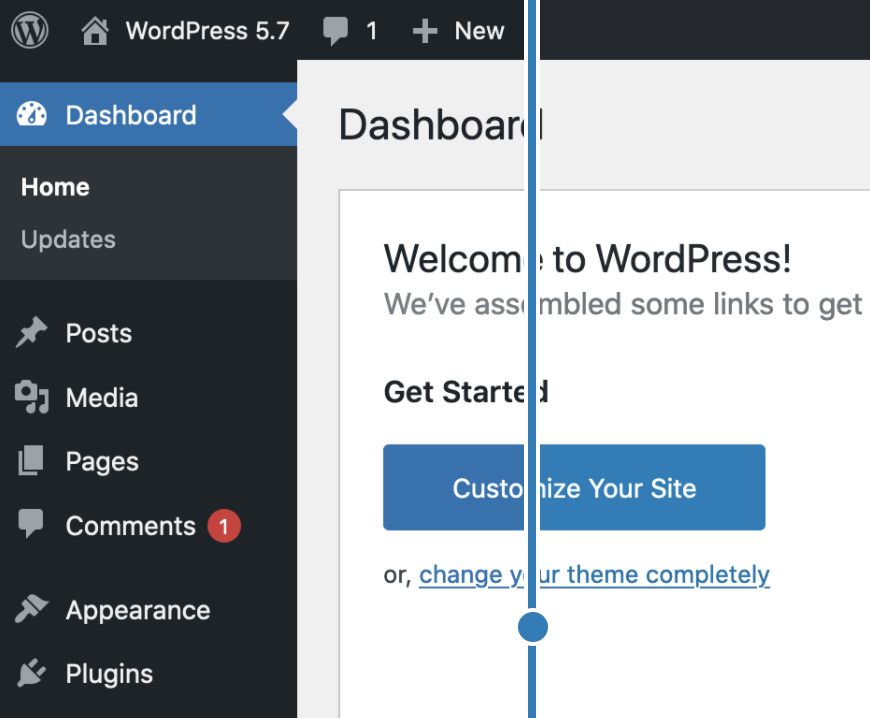
    Yep, I do manual updates and I recently updated this WP blog to the latest version, which is 5.7. On a user’s perspective, nothing seems to be new as I’m using the classic editor. I hate the Gutenberg editor and they have a new one now, it seems like Gutenberg, but an improved one.

    Automattic also said that the dashboard has a simplier color palette. But I didn’t notice any significant difference. Only the button seems to be using a lighter blue color compared to the blue color before.

    As you can see in the screenshot below, nothing’s really new.

    Looking forward for more WordPress updates in the future. For now, I’ll still be using the classic editor. It’s simple, it’s clean, and it’s classic. No other drag and drop gimmicks, just plain old text and plain old code. You can actually do whatever you want with no code bloat vs dnd page/post editors.

  • Error Reference: invalid certificate csr (ZeroSSL)

    If you’re renewing your SSL and selected autogenerate CSR and it’s always invalid, then you’re just encountering a temporary error.

    I always get this “An error occurred. Please try again or contact support. (Error Reference: invalid certificate csr)” when renewing my Let’s Encrypt Certificate via ZeroSSL.

    If you Paste your own generated CSR or manually generate CSR, it still doesn’t work.

    Only issue here is that it’s a temporary error.

    Just try it again later. Retried it after an hour via ZeroSSL dashboard, then it’s now working. Didn’t do anything to make it work. Just be patient and retry later.